


BTM_Pix
-
Posts
6,155 -
Joined
-
Last visited
Content Type
Profiles
Forums
Articles
Posts posted by BTM_Pix
-
-
I edited my comment because I couldn't be arsed arguing the toss with you about a product that you have absolutely zero knowledge of.
I haven't changed my mind about that one iota with your additional comments.
Seriously, I would rather hit myself over the head with my router than debate this with you.
So I'll just step out of it now thanks.
-
1 hour ago, flip21 said:
You probably too young to understand this...ok, here is a liitle bit of history

EDIT>>>>>
Nope, not today
<<<<<<<
-
-
8 minutes ago, jonpais said:
Anyhow, I'm not sure why anyone would start worrying about them not delivering what they promise.
There is a nine page thread on BMCUser about firmware requests that people want.
Nine pages.
Six months before its even come out.
We're positively like a Zen Buddhist commune in here by comparison
-
1 hour ago, mercer said:
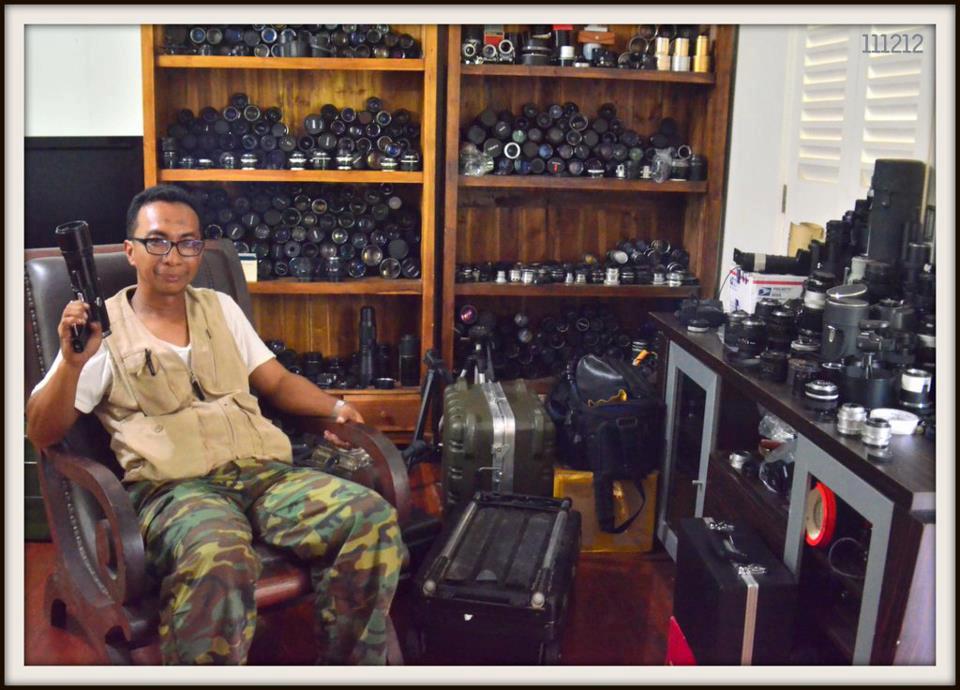
Sadly, I probably have nearly one shelf’s worth of lenses the guy has in that photo.
I've had to reinforce my shelves recently
1 hour ago, mercer said:I’ve been wondering when Sigma would start taking video seriously. I’ve read that the Foveon sensor has some limitations in that regard but with the popularity of their lenses for video, it would seem to be a perfect fit for them.
I think its been largely a question of processing grunt but that variable is always heading in their favour so I suppose its a question of when the two collide.
Might well be a long way off yet but they've got the building blocks.
-
-
1 hour ago, IronFilm said:
Some of those comments are pretty harsh. Doesn't seem like this is a good solution now for productions. Better off going with something else, like say CAME-TV Crystal-800, which is what I'd do if I had seven hundred dollars to blow. (would be sooooo useful as a boom op!)
https://www.came-tv.com/collections/wireless-hd-transmitter/products/came-tv-wireless-hd-video-kit
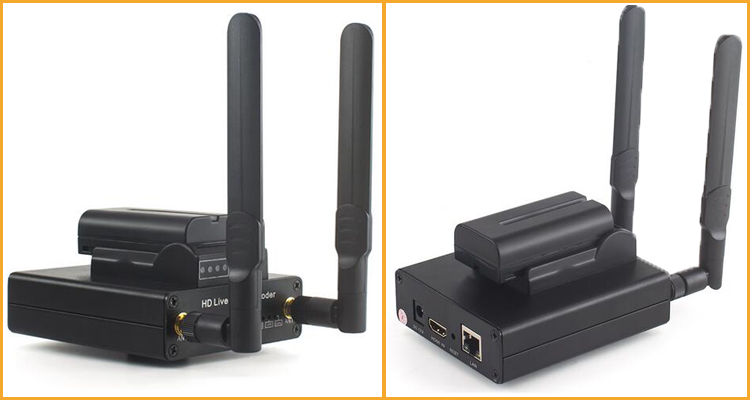
In a similar if far cheaper vein (£140 shipped) is this.
I got one last week and its basically a poor man's Terradek Vidiu.
Takes HDMI input and sends it out wirelessly (or wired) on its own network or via your existing router and as it just uses standard protocols you can monitor it on whatever device you want be it phone, tablet, laptop or even TV using whatever app you prefer (VLC or whatever).
Its also able to be used as a source for tablet based live video production apps such as Terradek's Live:AIR so you can use a couple of them to create a wireless 2 camera live production setup.
It can also be used to stream your camera out to YouTube and Facebook etc.
They also do a version with a built in 4G cellular modem so you can do that direct if you are away from a wired or wireless internet connection.
I'll do a proper thread about it at some point when I've got a minute.
-
1 hour ago, mercer said:
The 35mm f/2 was one of the lenses I regret selling. I had a great copy I only paid 70 bucks for. I had it for a year, sold it and nearly tripled my money. Of course now it’s hard to find a good copy for less than $200.
I had sold it in favor of the 35mm 1.4, but since realized I should have kept the f/2 instead. The 1.4 is special but my copy had a weird color shift wide open... blues looked brown. Obviously I could correct for it, or stop down, but at that point I should have just kept the f/2 because my copy was pretty sharp wide open.
Oh well, you live, you learn.
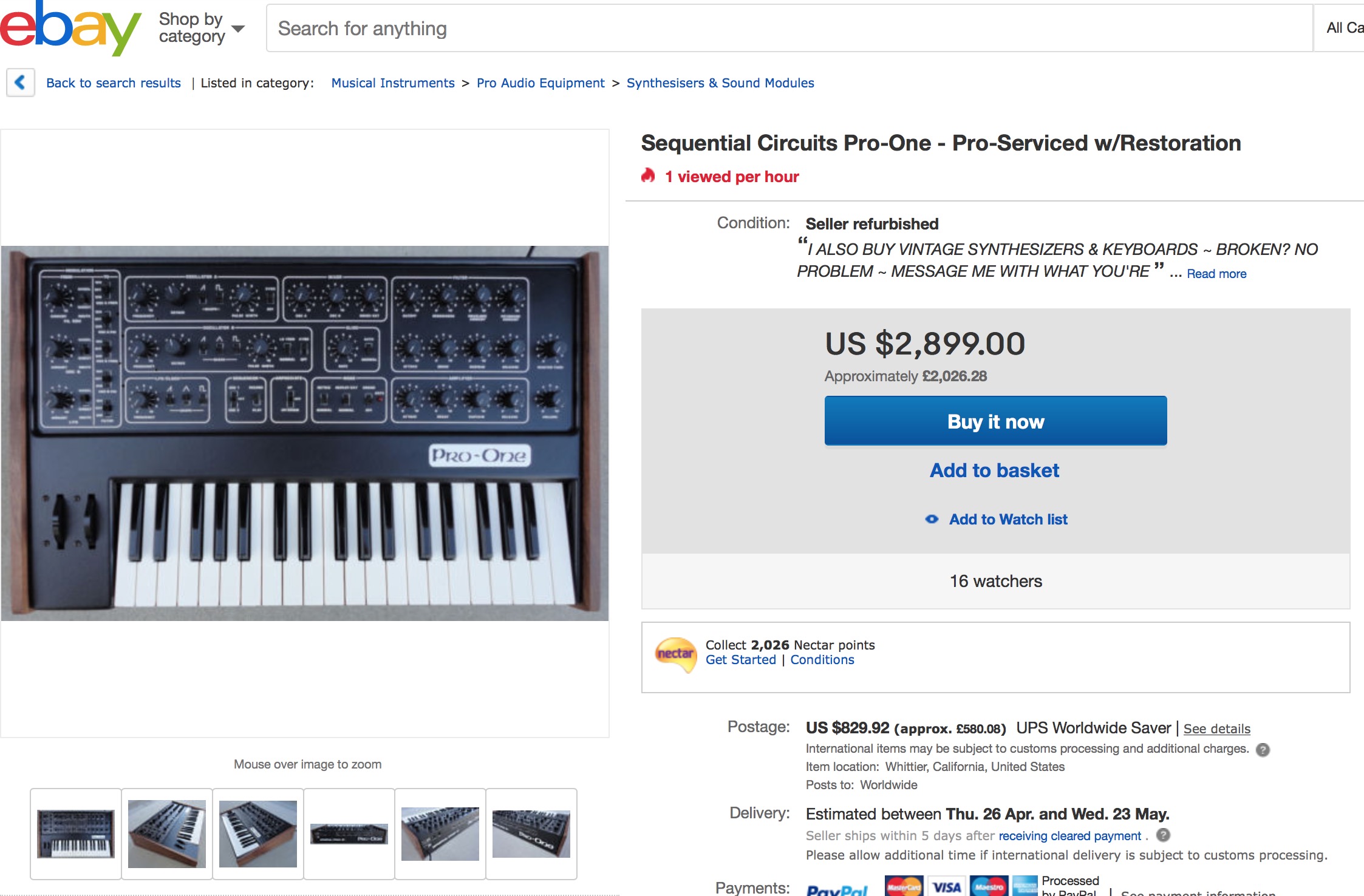
In the late 80s, I was in a junk shop that had bought up a load of stock of a music shop that had gone bust and he had at least a dozen Sequential Circuits Pro One synths stacked up. At the time analogue synths were gathering dust on the shelves of music shops everywhere and particularly mono synths but I always liked the Pro One so as he was selling them for £70 each I bought one for me and one for my mate as I knew he'd fancy having one at that price. Obviously as I was buying two, I got the price down to £50 each.
The shopkeeper was trying to get me to buy 10 of them and said I could have them for £400 for the lot.
I passed because a) I didn't have that kind of money on me (or in the bank!) b) I couldn't have fitted them in the car and c) who the hell would I ever sell the other 8 too?
Just checked eBay now and well.....
1 hour ago, mercer said:Since I last replied, a half hour ago, I started looking at some of the original SMC Pentax lenses. I think they’re referred to as the K Versions in Pentax circles. What I find interesting about them is they’re supposed to be the same optical formula as the Takumars with better coatings, and they didn’t use Thorium, so there is no risk of the common yellowing that some Takumars have. I briefly had the 50mm 1.4 and 35mm 3.5 a few years back and they were pretty amazing.
As I said in a previous comment, I only have a couple Series E lenses and some old non-ai’s, so I’m not really invested in Nikkors right now...
My other option that kinda intrigues me is slowly collecting some old Canon FD L lenses and then getting the Ed Mika conversions done to them. I had a Canon 50mm 1.4 that was converted and I really liked how they easily rendered a vintage look with similar color characteristics as their modern EF siblings.
I don’t know... just thinking out loud. My GF could not care less, so luckily for you, you’re stuck reading my musings... lol.
When I was a youth, we all started off using our Dad's Zenith Es or Praktica MTL3s (they loved those eastern bloc cameras!) then when it was time to get our own everyone went Japanese and the Pentax ME Super was hugely popular at the time. Looking on eBay, I think that might be the best route in to hoover up some bargains as there are loads of them for sale that include a couple of lenses into the bargain.
If your GF begins to worry about the lens collection growing, I always find its a good idea to have this photograph to hand for perspective on just how restrained you're actually being.
1 hour ago, mercer said:And yeah, the Sigma looks good. And you’re right it could act as a fast modern 55 or 58mm lens. Are you definitely getting a Pocket 4K...
I’m kinda undecided now. I’m definitely not going to be an early adopter, so for now, I am going to continue to enjoy my 5D3. What happens next year, when I’d be ready to buy one, who knows?
It’s insane to think about what could be available. Although unlikely, for all I know, a Canon FF mirrorless could have 1080p RawLite with DPAF... that would become a no brainer for me. For my style of shooting, I’m really interested in getting a camera with DPAF, but for the money, the P2 is pretty special. But then I’ll be pondering a new lens quagmire. Ugh. Lol.
Anyway...
I'm in the queue for one.
I was seriously considering a GH5 and then the GH5s threw a spanner in the works and had me going round in circles about choosing between them.
The unexpectedly low price of the P2 means that by the time it comes out I can probably get that and a used GH5 for roughly the price of the GH5s on its own.
Canon could release that camera you want tomorrow but you know they won't!
The real dark horses for me in the next few years could be Sigma as they've filed a patent for what would amount to a Foveon sensor for video.
That would be something genuinely different and they have their own lens lineup (as well as expertise in everyone else's AF) to marry it to.
-
1 hour ago, mercer said:
@BTM_Pix they both look nice... but damn that Nikkor! I’ve been exploring all of my lenses and lens options over the past few months.
For financial reasons, I’ve sold some I wish I could have kept and tested some I wish I never bought.
And in the end, for my manual lenses, I’m gonna end up going full circle back to ai-s Nikkors. The price/quality ratio really is unmatched on the used market.
I hope to keep everything in the f/2 range and that 105mm looks brilliant.
It ended up costing £140.
I've seen them cheaper but it is in very decent condition so I'm not complaining !
I'm going to Japan next month for the first time in just on 20 years so I'm going to try and root out a couple more ais lenses from my youth like the 35mm f2 and the 200mm f4. They won't necessarily be any cheaper but my experience of buying used in Japan is that they are almost without exception in far better condition.
That Sigma has a lot more vibe in it than that grab would suggest when you get in closer by the way. I think its a very decent choice for a standard lens on the Pocket4K as with the smaller crop it won't be far off 55mm equivalent FOV.
-
Very brief trip to London where I decided I wasn't going to trawl around used shops and buy a lens.
And I succeeded in that I didn't buy a lens but two. Both quite different and many years apart in age.
Had about 10 seconds to put them both on a GX80 and take a short clip in the street with each before I got on the train.
First up is one that @jonpais turned me on to which is the Sigma 30mm f1.4 native MFT
Next up is saying hello to an old friend 20 years after I sold the first one I had which is the Nikon 105mm f2.5 AIS
The discount on the Sigma paid for almost half the price of the Nikon.
Which is the story I'll be sticking to when I get home.
-
5 minutes ago, IronFilm said:
Link? As a quick google and I only found this (which isn't exactly relevant): https://github.com/mungewell/openDR-Remote -
The remote port protocol for the Tascam has been discovered so a small arduino, a button and a couple of 2.5mm cables can send the start/stop commands simultaneously in the LANC format to the camera and the Tascam format to the recorder.
Obviously, this would also work with any other LANC camera so BMPCC etc would be equally applicable beneficiaries
Oh...and for LANC also read WiFi so the same stunt could be pulled for the usual suspects from Panasonic.
-
And if you want to sync start recording on that DR60mkii with the C100 then naturally I have a cunning plan for that...
-
For me, @mercer 's unintentional christening of it as The Pocketii has stuck with me.
I'll be in Modena in July so I might see if someone can re-house it in chrome and leatherette with walnut finish loupe for the rear LCD with an eyepiece made from hand fed calf hide with accent stitching.
See if they can fit some chrome exhausts to the bottom as well.
-
Great test.
I'm not sure I'm any the wiser about motion cadence but after about 55 seconds of watching that pendulum I definitely felt that I could've been prompted into giving up smoking and getting over my fear of flying
- Don Kotlos, jonpais, Trek of Joy and 1 other
-
 2
2
-
 2
2
-
14 minutes ago, mercer said:
Yeah, I am searching for a 100mm. And then eventually I may pick up another 35mm f/2.5. I’ve had two of them but neither were in stellar condition, so I’ve sold them.
I really need a 70-200mm (or some variant of those focal lengths) I’d rarely use it... until I need it and I have been in a few situations recently where I really could have used one... that Series E seems like a no brainer at that price.
There is a 70-210mm in the Series E range that might be worth a look.
Its a bit slow (f4) but optically its very good.
Generally available for way less than £50 as well !
-
This is what Grant Petty had to say when they acquired DaVinci in 2009.
"When we were doing the due diligence on DaVinci, I saw a $50,000 price in the price list if you bought a secondhand system, and now wanted to be supported by DaVinci. And not only that, you're paying upward of $80,000 a year for support contract after that."
That was just the service charge price you paid to get it checked out if you bought a second hand one.
At that time he was talking about getting the purchase price of the high end systems down from $850K to $500K
At $1299, I'd say its the camera you are getting for free and not the software.
- Nathan Gabriel, IronFilm and sanveer
-
1
-
 2
2
-
-
10 hours ago, jonpais said:
I will bet you a plane ticket to Vietnam that if I show you two movies side-by-side on my LG OLED, that you will no longer think the same way.
At the risk of this becoming even more off topic, can I just say that this must be made to happen as you two co-hosting a vlog arguing about this stuff would be absolutely compulsive viewing
-
If you don't mind a bit of a project.....?
You can start and stop the MixPre 3 with keyboard commands on its USB port (CTRL+R and CTRL+S) and the arduino boards like the Sparkfun Pro Micro have easy programmable functionality to emulate a keyboard. They can also be used to make LANC controls (with a minimal amount of breadboard action
).
So you could make a very simple (and very small) box with a simple push button that would start/stop the C100 over LANC and also simultaneously start/stop the MixPre 3 over USB with the TC being passed via HDMI from the C100 to the Atomos to the MixPre 3. Or even a small HDMI splitter if the Atomos is stripping it.
The little box would actually be powered by the LANC port of the C100 as well.
-
1 hour ago, mercer said:
It could be a cool two lens set up with my Nikon 50mm Series E.
That was the first Nikon lens I ever owned as it was the kit lens with my EM when I was but a pup!
If you come across the 75-150mm Series E it is also a bargain. I regularly see them on eBay for less than £40.
The 100mm f2.8 Series E as well is worth a look for what they go for as well. Really compact little thing.
-
-
2 minutes ago, mercer said:
But if you look at Instagram and see the quality of work being done on Canon DSLRs and you begin to question everything you read on any forum.
The same is true with lenses that you see not getting a great deal of love - or even outright contempt - and then you look at the Flickr pool for it and there is page upon page of great images shot with it.
6 minutes ago, mercer said:Let’s be honest here... are people really going to buy this camera for its phone coverage or its holograms?
On that particular thread - amongst the pom pom waving about the delay - someone asked if anyone knew how he could edit his videos that he shot with it.
I could hear the sound of the tumbleweed bouncing along the tarmac even from this side of the Atlantic
I am intrigued by the Hydrogen but I'm a bit like a dog chasing a car in that I'm not entirely sure what I'd do with it if I caught it.
-
1 minute ago, IronFilm said:
I think the extreme hatred/skepticism/negativity towards RED in the early days caused them to close ranks, and those effects still linger in their culture to today.
Yeah, their thread about the new BMPCC4K was quite interesting
9 minutes ago, Snowfun said:Don’t get me worried! I preordered a Hydrogen...
But, I agree, the worship on those fora is fascinating - I could be wrong but I’ve always assumed that hardcore professional RED users don’t bother with reduser as they'll have direct access to those who count. It’s the aspirational types desperate to impress who lead the kneeling rituals. I still think that a photo of using the Hydrogen running the BM app to control the Pocket 4K will go down a storm on That site...
I'd love to be at that Hydrogen launch event to see how the forum's collective persona translates into the real world when they actually meet Brian, erm, I mean Jim.
I'd especially be interested in knowing what he thinks of it.
I mean, he must know its a bit 'unusual' for grown adults to react to what are often negative statements with such fervour?
Even Steve Jobs would be saying "OK, lets tone this down a notch lads"



.jpg.42cd4aaba8a5c05ad1fa3841eb702413.jpg)
.jpg.e6640f9c19ba88248e1363b9321e0a4d.jpg)


LukiLink project turns smartphones into an HDMI monitor
In: Cameras
Posted
Sigh....
The actual real demonstrable health issues being created by the ubiquity of Wifi have nothing to do with RF.
Obesity and diabetes caused by the sedentary lifestyle that the internet has created, burgeoning mental health issues driven by and stimulated by social media addiction....and on and on.
Those are the real problems that Wifi brings.
Sitting further away from your router isn't going to solve them any time soon.
I'm going to miss these sort of insights.
Definitely out now.