kye
-
Posts
8,260 -
Joined
-
Last visited
Content Type
Profiles
Forums
Articles
Everything posted by kye
-
I disagree about audiophile communities, which I was part of for a couple of decades from the mid-90s on. The parallels I see are: Blind-belief is the default perspective for most of the people involved - those who believe that specs are what matters vs those who think that aesthetics are the only thing that matters - and neither side is willing to reach across the chasm so communication is rare Fanaticism is common - which could be to some subset of specifications or one particular manufacturer who can never do any wrong Doing things yourself is almost always deemed impossible and the very few people doing it are frequently hassled by the people telling them that it can't be done The default mindset is that price = performance - this is emphasised in both directions Egoists pour money into the most expensive products and then show them off online for attention Micro-details will get a 50-page thread where people argue about things, but discussion about music (which is the whole point of the whole damned thing) rarely gets more than casual engagement Where I see EOSHD as being somewhat different is that people here can often see across both sides of the tech vs aesthetics debate. I was in a pocket of audiophiles who doing high-end DIY and meeting physically and who also knew that both specifications and aesthetics mattered, so I'm aware they exist, but we were unicorns and this mindset was virtually unknown online. To me the above tendencies are a natural and predictable outcome based on human psychological weakness and a consumer culture. Thinking is hard, the topics are enormously complex (involving physics, analog and digital electronics, human sensory organs, psychology, and artistic preferences and tastes), there are vested interests everywhere, and humans have a deep desire to feel like they are safe and that the world isn't chaos, so we tend to cling to pre-defined theories of the world despite being presented with evidence to the contrary.
-
That makes sense but has nothing to do with sensor size, it's lens FOV. Shutter speed also makes sense, but only so much that the edges can be detected easily, which would have been easy on that test clip of the guy as he was crisply in focus and contrasting sharply with the background.
-
Speaking of what high-end images actually look like, here are some 8K scans of IMAX 5-perf from Oppenheimer. https://dam.gettyimages.com/universal/oppenheimer The files with filenames like GF-number seem to be 3K, but the other ones seem to be 8K TIFF files - 133Mb each! How do they look? Strong colours, often strong contrast, not sharp.... like cinema.
-
I've seen people say things like this before, but it never made any sense. Digital image stabilisation is a data processing operation done by a chip - you give it a stream of digital video and it does it's thing and gives you a modified stream of digital video. It wouldn't matter if the source of the video was a GoPro or an array of telescopes the size of the entire planet - it's data crunching.
-
I noticed he said that, but to me it makes little sense. 1) He said the shot looks like a tripod shot, yet it clearly has handheld motion 2) The shot he shows has both IOS and DIS enabled, and although he doesn't give a comparison on the 35mm, the other shots comparing different modes showed no real difference between the OIS only and OIS+DIS shots 3) Your conclusions about needing a gimbal may apply to your work and to the R5, but don't necessarily apply to the wider film-making environment. The IBIS on the GH5 has a 'Locked' mode which really does look like a tripod, but the non-locked mode is much more reminiscent of a handheld heavy cinema camera to my eye, having movement but no jitter. When you add a lens with OIS to get IBIS+OIS in what Panasonic call Dual-IS, the result is somewhere between a handheld heavy cinema camera and a gimbal, and can be very effective in harsh conditions, or can provide gimbal-like results in easier ones. What surprises me is the poor performance of the DIS on that guys clips. GoPros, for example, are DIS-only and are gimbal-like, so it is possible to get very high performance. Perhaps Canon have implemented a very limited crop, or similar?
-
Specifications sell products to people who don't know how to judge something for themselves.
-
What a strange result - the Digital IS looks like it hasn't applied any stabilisation at all! I'd almost be looking to see what results other people have found - maybe that guy had a bad unit or screwed up somehow. I'm not really a fan of Digital IS, but it's better than that surely...?
-
Yep - well said!
-
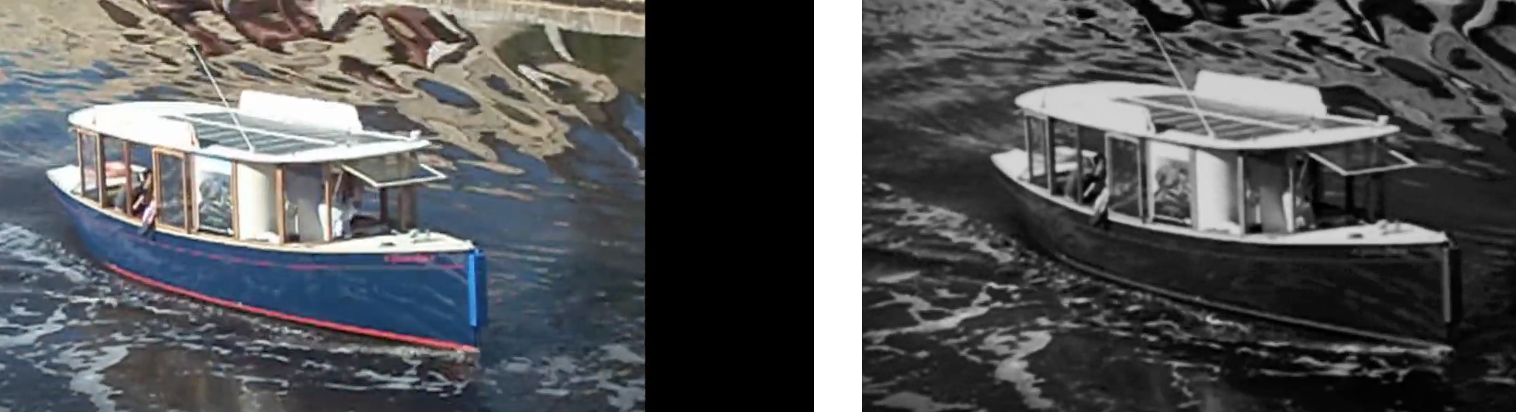
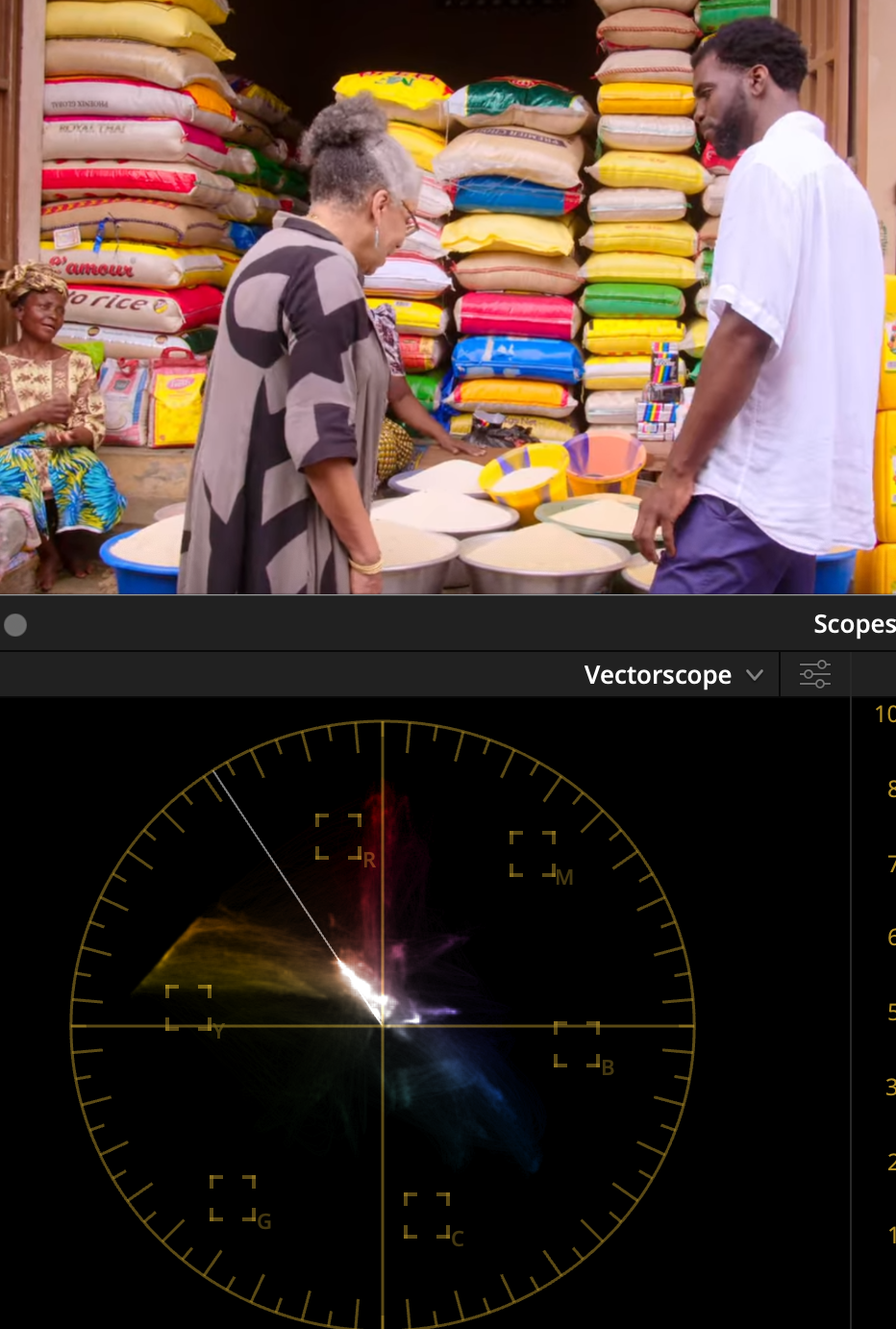
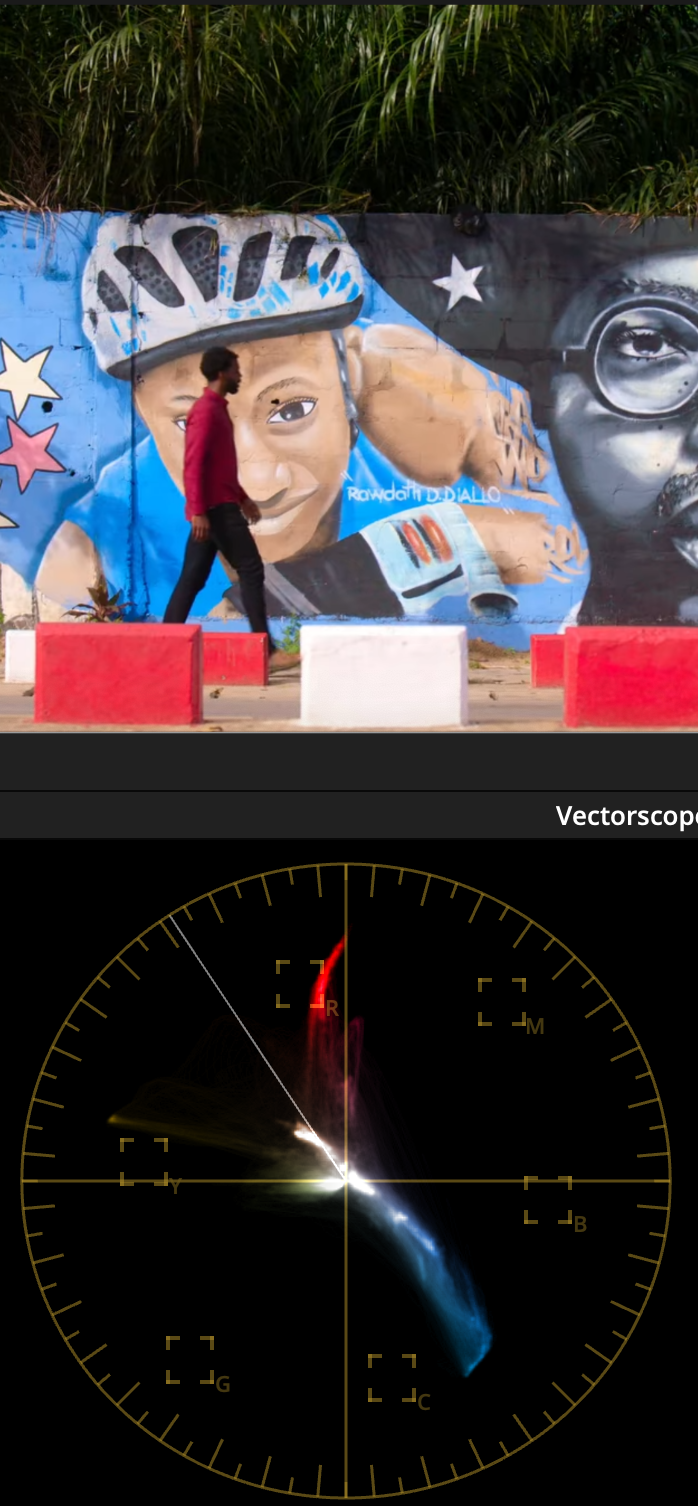
I've learned a lot about film-making over the years, most of it came through discovery and experimentation, but the best film-making advice I ever got was this... See how much contrast and saturation you can add to your images This probably sounds ridiculous to you, and I can understand why it would, but hear me out. Not only is it deceptively simple, but it's hugely powerful, and will push you to develop lots of really important skills. The advice came from a professional colourist on some colour grading forums after I'd asked about colour grading, and as I make happy holiday travel videos it seemed to be a logical but completely obvious piece of advice, but it stuck with me over the years. The reason I say "over the years" is that the statement is deceptively simple and took me on a journey over many many years. When I first tried it I failed miserably. It's harder than it looks... a lot harder. The first thing it taught me was that I didn't know WTF I was doing with colour grading, and especially, colour management. Here's a fun experiment - take a clip you've shot that looks awful and make it B&W. It will get better. Depending on how badly it was shot, potentially a lot better. It took me years to work out colour management and how to deal with the cameras I have that aren't supported by any colour management profiles and where I had to do things myself. I'm still on a learning curve with this, but I finally feel like I'm able to add as much contrast and saturation as I like without the images making me want to kill myself. I recently learned how the colour profiles work within colour management pipelines and was surprised at how rudimentary they are - I'm now working on building my own. The second thing it taught me was that all cameras are shit when you don't absolutely nail their sweet-spot, and sometimes that sweet-spot isn't large enough to go outside under virtually any conditions, and that sometimes that sweet spot doesn't actually exist in the real-world. Here's another fun and scarily familiar experiment - take a shot from any camera and make it B&W. It makes it way better doesn't it? Actually, sometimes it's astonishing. Here's a shot from one of the worst cameras I have ever used: We're really only now just starting to get sub-$1000 cameras where you don't have to be super-gentle in pushing the image around without risking it turning to poop. (Well, with a few notable exceptions anyway... *cough* OG BMPCC *cough*). Did you know that cinematographers do latitude tests of cinema cameras when they're released so they know how to expose it to get the best results? These are cameras with the most amount of latitude available, frequently giving half-a-dozen stops of highlights and shadows, and they do tests to work out if they should bump up or push down the exposure by half a stop or more, because it matters. Increasing the contrast and saturation shows all the problems with the compression artefacts, bit-depth, ISO noise, NR and sharpening, etc etc. Really cranking these up is ruthless on all but the best cameras that money can buy. Sure, these things are obvious and not newsworthy, but now the fun begins.... The third thing it taught me was to actually see images - not just looking at them but really seeing them. I could look at an image from a movie or TV show and see that it looked good (or great), and I could definitely see that my images were a long way from either of those things, but I couldn't see why. The act of adding contrast and saturation, to the point of breaking my images, forced me to pay attention to what was wrong and why it looked wrong. Then I'd look at professional images and look at what they had. Every so often you realise your images have THAT awful thing and the pro ones don't, and even less often you realise what they have instead. I still feel like I'm at the beginning of my journey, but one thing I've noticed is that I'm seeing more in the images I look at. I used to see only a few "orange and teal" looks (IIRC they were "blue-ish" "cyan-ish" and "green-ish" shadows) and now I see dozens or hundreds of variations. I'm starting to contemplate why a film might have different hues from shot-to-shot, and I know enough to know that they could have matched them if they wanted to, so there's a deeper reason. I'm noticing things in real-life too. I am regularly surprised now by noticing what hues are present in the part of a sunset where the sky fades from magenta-orange to yellow and through an assortment of aqua-greens before getting to the blue shades. The fourth thing it taught me was what high-end images actually look like. This is something that I have spoken about before on these forums. People make a video and talk about what is cinematic and my impression is completely and utter bewilderment - the images look NOTHING like the images that are actually shown in cinemas. I wonder how people can watch the same stuff I'm watching and yet be so utterly blind. The fifth thing it taught me was how to actually shoot. Considering that all cameras have a very narrow sweet spot, you can't just wave the damned thing around and expect to fix it in post, you need to know what the subject of the shot is. You need to know where to put them in the frame, where to put them in the dynamic range of the camera, how to move the camera, etc. If you decide that you're going to film a violinist in a low-bitrate 8-bit codec with a flat log profile, and then expose for the sky behind them even though they're standing in shadow, and expect to be able to adjust for the fact they're lit by a 2-storey building with a bright-yellow facade, well... you're going to have a bad time. Hypothetically, of course. Cough cough. The sixth thing it taught me is what knobs and buttons to push to get the results I want. Good luck getting a good looking image if you don't know specifically why some images look good and others don't. Even then, this still takes a long time to gradually build up a working knowledge of what the various techniques look like across a variety of situations. I'm at the beginning of this journey. On the colourist forums every year or so, someone will make a post that describes some combination of tools being used in some colour space that you've never heard of, and the seasoned pros with decades of experience all chime in with thank-you comments and various other reflections on how they would never have thought of doing that. I spent 3 days analysing a one-sentence post once. These are the sorts of things that professional colourists have worked out and are often part of their secret-sauce. Examples. I recently got organised, and I now have a project that contains a bunch of sample images of my own from various cameras, a bunch of sample images from various TV and movies that I've grabbed over the years, and all the template grades I have developed. I have a set of nodes for each camera to convert them nicely to Davinci Wide Gamma, then a set of default nodes that I use to grade each image, and then a set of nodes that are applied to the whole project and convert to rec709. Here's my first attempt at grading those images using the above grades I've developed. (This contains NO LUTs either) The creative brief for the grade was to push the contrast and saturation to give a "punchy" look, but without it looking over-the-top. They're not graded to match, but they are graded to be context-specific, for example the images from Japan are cooler because it was very cold and the images from India were colourful but the pollution gave the sun a yellow/brown-tint, etc. Would I push real projects this far? Probably not, but the point is that I can push things this far (which is pretty far) without the images breaking or starting to look worse-for-wear. This means that I can choose how heavy a look to apply - rather than being limited through lack of ability to get the look I want. For reference, here are a couple of samples of the sample images I've collected for comparison. Hollywood / Blockbuster style images: More natural but still high-end images: Perhaps the thing that strikes me most is (surprise surprise) the amount of contrast and saturation - it's nothing like the beige haze that passes for "cinematic" on YT these days. So, is that the limits of pushing things? No! Travel images and perhaps some of the most colourful - appropriate considering the emotions and excitement of adventures in exotic and far-off lands: I can just imagine the creative brief for the images on the second half of the bottom row... "Africa is a colourful place - make the images as colourful as the location!". In closing, I will leave you with this. I searched YT for "cinematic film" and took a few screen grabs. Some of these are from the most lush and colourful places on earth, but..... Behold the beige dullness. I can just imagine the creative brief for this one too: "make me wonder if you even converted it from log...."

-
Or manufacturers could just sell proper cameras. I saw a post in FB group where I guy said he shot a whole day (I think it was a sports carnival?) in 4k120 in direct sun and the camera didn't overheat. If cameras like the BM Micro Cinema Camera and Canon XC10 can fit cooling fans then there's really no excuse.
-
You know it's a good thread when people start pulling out the latin phrases!!
-
Great post. As a fellow computer science person, I agree with your analysis, especially that it will get better and better, and will get so good that we will learn more about the human condition due to how good it will get. This is also not something new, in the early days of computer graphics, someone wrote a simulation of how birds fly in formation and it was so accurate that the biologists and animal behavioural scientists studied the algorithms and this is how the 'rules' of birds flying in formation were initially discovered. I just wanted to add to the above quote by saying that studios have already made large strides in this direction with the comic-book genre films, whose characters are the stars and not the actors that play them. This is an extension of things like the James Bond films. These were all films where the character was constant and the actor was replaceable. VFX films are the latest iteration of this, where the motion capture and voice actors and the animators are far less known, and when it's AI replacing those creatives to make CGI characters that will be the next step, and then it will be AI making realistic-looking characters. For those reading that aren't aware of the potential success of completely virtual characters and how people can bond with a virtual person, I direct your attention to Hatsune Miku, a virtual pop star: Link: https://en.wikipedia.org/wiki/Hatsune_Miku She was created in 2007, which in the software world is an incredibly long time ago, and in the pop star world is probably even longer! But did it work? That's a figure from over a decade ago and equates to just over USD$70,000,000, which is almost USD$100M in todays money. I couldn't find any reliable more recent estimates, but she is clearly a successful commercial brand when you review the below. What does this mean in reality though, it's not like she topped the charts. Here is a concert from 2016 - she is rear-projected onto a pane of glass that was mounted on the stage. She was announced as a performer at the 2020 Coachella, that was cancelled due to covid. So, while Japan might be more suited to CGI characters than the west is (although that is changing) - take the Replika story for example. Replika is a female virtual AI companion who messages and sends pics to subscribers, including flirty suggestive ones. The owners of Replika decided that the flirty stuff should be a separate paid feature and turned it off for the free version - the users reacted strongly. So strongly in fact that it's now an active field of research for psychologists trying to figure out how to understand, manage and regulate these things. It's one thing for tech giants to 'curate' your online interactions, but it's another when the tech giants literally control your girlfriend. Background: https://theconversation.com/i-tried-the-replika-ai-companion-and-can-see-why-users-are-falling-hard-the-app-raises-serious-ethical-questions-200257 There are also other things to take into consideration as well. Fans are very interested in knowing as much as possible about their idols, but idols are real people and have human psychological needs and limitations, but virtual idols will not. The virtual idols that share their entire lives with their fans will be even more relatable than the human stars that need privacy and get frustrated and yell at paparazzi etc. These virtual idols will be able to be PR-perfect in all the right ways (i.e. just human enough to be relatable but not so human that they accidentally offend people). There is already a huge market for personalised messages from stars, virtual idols will be able to create these in virtually infinite amounts. Virtual stars will be able to perform at simultaneous concerts, make public appearances wherever and whenever is optimal, etc. And if you still need another example about how we underestimate technology... "Computers in the future may weigh less than 1.5 tons.” - Popular Mechanics magazine, 1949.
-
Makes sense. I did think that it would likely be a quite different rendering than the modern lenses that you've been using, so was wondering how that would go. I think vintage lenses suit a certain style of shooting where things are very controlled. This means that you can have control over the flaring and halation and other vintage lens characteristics because you can adjust lighting and matte boxes etc. Unfortunately for high-paced run-n-gun shooting it is nice to have these things kept to a minimum so you're not so limited by them. Still, it's always an interesting experiment and sounds like you're wiser for it.
-
Deep Fake Love... a reality show that basically uses AI Deep Fake tech to torture the contestants... https://www.euronews.com/culture/2023/07/25/the-cruellest-show-on-tv-deep-fake-love-goes-too-far-with-ai I just checked Netflix AU and I have 8 episodes ready to watch.
-
I'm keen to see some frame grabs when you get them into post!
-
The main quality issue will be that you're uploading SD files, which YT thinks should be delivered at an ultra-low bitrate. I suggest exporting at 1080p, with a healthy bitrate. The traditional wisdom is to upload at 50+Mbps, but as your content is SD, a lower bitrate would probably be visually similar. In terms of the colour space, it's a little trickier, and the TLDR is to try and export using Rec709-A if that's available to you, otherwise you could try Rec709 and the different gammas (e.g. Rec709/Gamma2.4 or Rec709/Gamma2.2 etc). Unfortunately, it is very common for platforms to either not properly support colour management or have bugs. I suggest a bit of googling to get specific instructions on FCPX and YT, there should be some good advice out there.
-
I don't think we should extrapolate that to decide what is best for the prosumer market. If we compare RAW with Prores (especially Prores 4:4:4 which is sadly completely lacking from the prosumer market), then we see that: Prores is compressed, but so are most forms of RAW RAW has to be de-bayered but RAW is also frequently compressed in a lossy way as the bitrates are almost unmanageable otherwise - this is especially true considering that most implementations of RAW are at the sensors full resolution, or are a brutal crop into the sensor completely revising your whole lens package RAW is ALL-I, but so is Prores Prores is constant-bitrate per pixel, but so is RAW RAW is "professional" quality, but so is Prores The comparison even extends into licensing, where there's been frequent speculation about licensing fees being a barrier to why manufacturers are reluctant to include Prores, and with RAW the patents are also a barrier. The more I think about this, the more that I think cameras should just implement the full-range of Prores codecs (LT, 422, HQ, and 444) and forget about RAW with all the BS that seems to go along with it... the image quality, bit-depths, bit-rates, performance in post, support across platforms, and licensing all seems to be similar to RAW or in the favour of Prores.
-
Interesting.. I thought this was a good explainer: TLDR; Nolan only mixes for the best theatres, and doesn't care about shittier ones. I guess that arrogance has run its course, since you saw it on IMAX and still couldn't hear it!
-
I think the biggest weakness of these budget cameras is the lack of good codec / bitrate. In practice it puts a ceiling on what you can do with the images in post, however, having multiple cameras might go some way to mitigating that issue. For example, if they created a setup where there were focal lengths like a phone with a super-wide and a 'normal' (and maybe even a tele), then this would mitigate the issue of having to crop heavily into a super-wide. Also, if they had a sensor that allowed a 2x digital crop (for example), that was coming from a sensor with >4K resolution, then that would allow a 2x digital crop to downsample from >1080p. If that mode was also paired with processing that had dedicated levels / algorithms for that mode, and was saved as a 10-bit file, it would be quite flexible in post. (All else being equal, a downsampled 1080p file with a small amount of sharpening to compensate is practically indistinguishable from a 4K file). This would also allow the two (or three) focal lengths to be spread apart further, increasing its flexibility. The lack of something wider than 24mm equivalent is a major limitation for the form-factor though, as something wider than 20mm not only enables vlogging, but also allows for a great number of situations where a tiny pocketable camera is most desirable (viewing the incredible vista from lookouts, getting shots in narrow European streets that are wide enough to show the buildings as well as the street, getting shots inside venues like cafes and restaurants without having to out your camera so far away from you that people wonder WTF you're doing or that you've forgotten it, etc etc). There's a reason that Apple puts an ultra-wide and a normal lens on the two-camera iPhones, rather than putting the normal/tele combo. It's because the ultra-wide is more useful to the average person in normal life and on holiday.
-
I never thought about it that way but I think you're right...... Sony delivers enormously expensive firmware updates, they just come with a free camera!
-
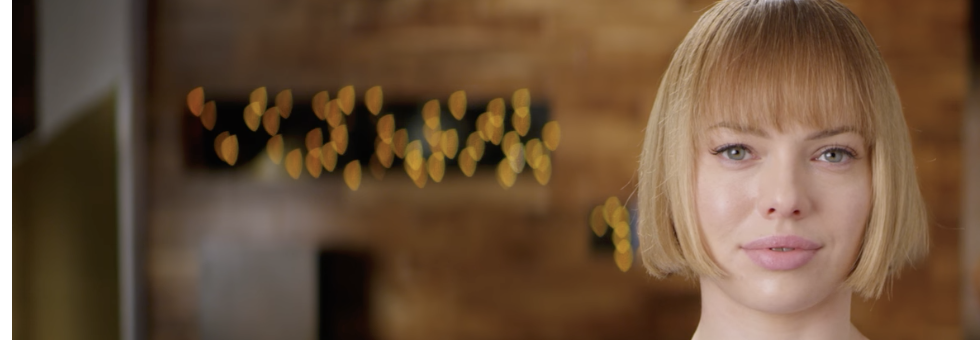
It's likely that most footage you've seen from the Helios is when it is at its peak swirl settings, which is what it is famous for, but that requires the right combination of subject/focal distance and background distance/contrast. Lots of people buy a Helios and are disappointed because it's no-where near the swirliness they see in all the pictures. Here's a more general review of one of the models, focusing beyond the swirl and including a bunch of normal compositions. Also, it's worth pointing out that while the Helios does swirl, so do lots of other lenses from this time, and they do so almost as much. Once again, the internet glorifies the one that is "the most" of something and the ones that are a close second get no attention whatsoever (link with timestamp): Also, and this is quite controversial I know(!), but it is possible to close the aperture of these lenses(!!), and this tends to increase contrast and sharpness and reduce flaring etc - all the things that happens when you do this to other lenses(!!!). Here's a range of compositions comparing the lens wide open and then stopped down (linked to timestamp): Plus, all the swirls happen further out from the centre of the frame, so if you use it on a crop sensor then you're effectively cropping out the worst part of those optical distortions. Plus, lots of well known and highly prized cine lenses also swirl quite a bit, yet the films shot on them aren't a swirly mess. Here's a controlled test of a bunch of them, just skip through it looking at the string of lights in the background: and finally, if you crop to a wide aspect ratio, the "swirl" will only be seen on the very sides of the image, which means that the swirls are limited to being quite close to vertical - very similar to an anamorphic bokeh! Here is the Master Anamorphic 50/1.9 - potentially the most optically correct anamorphic lens ever made, and yet the bokeh is oddly-shaped with cat-eye rendering and also differently shaped towards the edges vs the middle: Compared with a swirly spherical lens like the Super Baltar 50/2.3: The character of the bokeh changes on the swirly lens from anamorphic-like on the edges to normal in the middle, which some might find distracting, but you might also find to be less distracting because it limits the distractions to the edges of frame rather than being directly behind the subject. The Zeiss CP.2 50/2.1 has very similar rendering to the Baltar above, and yet is known as a relatively neutral lens and is a workhorse of Hollywood: What I find far more distracting in bokeh is the edges of the shape, rather than the geometry of the shape. Take this example of perfectly round bokeh balls and see how distracting the ones on the right are.. and don't even get me started on "bubble bokeh"
-
Which one(s) do you have your eye on?
-
Looks like someone found the contrast knob! If only they made a video about contrast instead of making the internets 100,000th video on the Helios and getting basically everything about it wrong.....
-
You better not swap... I'm still waiting on your report on the 40-80mm lens!
-
I'd forgotten that Matteo had a ZV-E1.. here are the other videos he has done with it. and this was what he shot with the ZV1 (NOT the ZV-E1) - just as a comparison