KnightsFan
-
Posts
1,385 -
Joined
-
Last visited
Content Type
Profiles
Forums
Articles
Everything posted by KnightsFan
-
Sigma's prior cameras have been photo-only Foveon cameras. They are pretty much the only cameras out there that don't use a CFA. The images always looked good to me, but have always been sort of a special purpose/novelty product. I always wanted one, but the SA mount put me off. I am looking forward to Sigma's Foveon cameras in L mount next year, as well as this new FP.
-
Hopefully. 24.00 isn't even a greyed out option at the moment. I highly doubt it, but it would be nice of course. With that enormous data rate, I don't think you would be able to do uncompressed Raw to SD or USB C at 4k120, even if the processor could handle it (which I don't think it can). If anything, I would say there's a slim, outside chance that Sigma could possibly drop a bombshell firmware update with 4k60 in a crop mode to counter new announcements from their competition. If they were pushing the envelope on specs to FF 4k60, I think they'd come out swinging with that as a headline. Awesome! I totally missed that, but that's a HUGE bonus for usability imo. Or maybe the "DC connector" is actually just a dummy battery itself? I don't really see any ports on the body, though it may not be final design I suppose.
-
@mkabi All framerates are greyed out except 23.976 when in UHD CDNG, you can see it at 2:06 in the video above. And now that I think about it, they really should have 24.00 in addition to 23.976 if they want to call it a cinema camera.
-
This is awesome! I'm glad Sigma has decided to make their own unique entry into this category. I've always said that the path to global shutter is through stills cameras without mechanical shutters, and it looks like this is a step in that direction. I can't wait to see how fast the readout is. The L mount alliance is (predictably) making huge strides with the "new" mount, with a slew of cameras and lenses now available. Some positives that catch my eye: 1. HDR videos. I guess it's similar to some of the phone technology we've discussed. 2. "Sigma FP key specs will be opened to encourage support from third party accessory makers" has me really intrigued. Considering we saw it mounted on a drone in the video, perhaps there will be an open control protocol, either with USB or bluetooth? Or perhaps they are talking with Atomos about ProRes Raw? Dare we hope? 3. Can be used as a webcam. That is great and opens up some interesting options for tethered video shooting as well as live streaming. 4. Looks like they have a HDMI clamp accessory. 5. APS-C mode, always handy to have On the other hand, I think there are some missteps on the FP. Maybe it's just a lack of information from the press releases, but here goes: 1. USB charging only when the camera is off. This means you need to use a dummy battery to use an external battery. That means no hot swapping, and more difficult to rig. 2. One thread on the bottom. Seriously, Nikon is the only manufacturer that decided to put even a locator pin slot on their cameras? 3. No 4k60. Oh well. I can't really fault Sigma too much. They are a smaller company, and Panasonic is the only manufacturer who does do 4k60 FF at the moment. 4. No LTC input. Would really be nice considering the cine marketing. 5. Those switches on the top might be difficult to use when rigged up. 6. Tiny, fiddly HDMI port We'll have to wait and see if there is an internal 10 bit. H.264 seems disappointing, I'd rather see HEVC. One thing we can say though, is that it looks like Sony really is dead last in announcing a mirrorless camera that can do 10 bit, internally or externally. Panasonic, Canon, Nikon, Leica, Blackmagic, Fuji, and now Sigma with cDNG.
-
OEM CPU overclocking support equivalent in the photography market
KnightsFan replied to JurijTurnsek's topic in Cameras
One problem is that computers don't go through the same punishment as cameras. An overclocker can test their aftermarket cooling and know that if it works in a benchmark on their desk, it will work indefinitely. A camera needs to work in a benchmark, in the rain, 8 hours in direct sunlight, or on top of a mountain after jostling around for a 5 hour climb. Compounding that, the people overclocking computers are computer geeks. If you are out there buying individual parts for a custom computer build, you can probably be trusted with overclocking capabilities since you necessarily know a little bit about how the components work. On the other hand, the guy who knows enough about photography to want to push their camera to the limit doesn't necessarily have any knowledge of the computer components inside the camera. The people who could be trusted to overclock a camera are still the computer geeks, not the photographers (though there is a small segment of the market that is both). -
Interesting results! I certainly disagree with the majority here haha. Though, I suppose in an uncontrolled test, people are going to be judging different things. I tried to ignore DOF, compression, and focus, and really just looked at colors to the best of my ability. It would be interesting to know why people voted the way they did.
-
Scaling would be for UI only, right? You could still watch native, unscaled UHD content but have 150% UI, correct?
-
How so? I enjoy my 5.5" HD phone screen. 27" is much more than 4x the size. I'm not looking to see every pixel all the time.
-
I wonder what would be worse, if they lied about spending millions of dollars on R&D, or whether RED actually spent millions only to settle on off-the-shelf parts.
-
I'm also looking for a 4k monitor. I'm still in the stage of gathering info. Anyone know anything about the ViewSonic VP2785-4K?
-
Fastest method to introduce statistical data on videos
KnightsFan replied to shooter's topic in Cameras
If you are using After Effects or similar software, you do NOT want to keyframe this type of thing. You can use scripting (or "expressions" as adobe calls it) to automate the size and position of graphical elements based on variables. I suspect there may also be more specialized tools or plugins for making graphs and other data visualizations. I do not have personal experience with any, though. It really should not be terribly difficult using after effects. -
Didn't they say the first couple entrants would get some headphones? I opted out when I did the survey. The thing about full frame is that it's only been around for a couple years. Most people who started on FF on their 5D2's and see it as "standard" don't have the artistic and financial clout, compared to the vast number of people who grew up on S35 film. Smaller sensors will always have their place in phones and other compact cameras, or in news and doc. But I think that as people who grew up during/after the DSLR revolution mature and become big name cinematographers, we will see more FF in the narrative film world. These days, every high end pro gets their start as a consumer.
-
Or we could just include the cost of film and processing as being part of the camera, if someone really wants to go that route?
-
Don't the GH5S/P4K/Z Cam E2/Terra 4K sensor have a quad bayer MFT sensor?
-
...which is a great way of discouraging anyone looking to actually build their skills. Not sure I like that idea. Without it i would make a serious foray into "best" video under $200. As it stands, lets just say I have @BTM_Pix beat on price. We'll see who wins on epoxying ?
-
My vote would be for no color grading allowed. Keep the focus on using the camera and shooting with it.
-
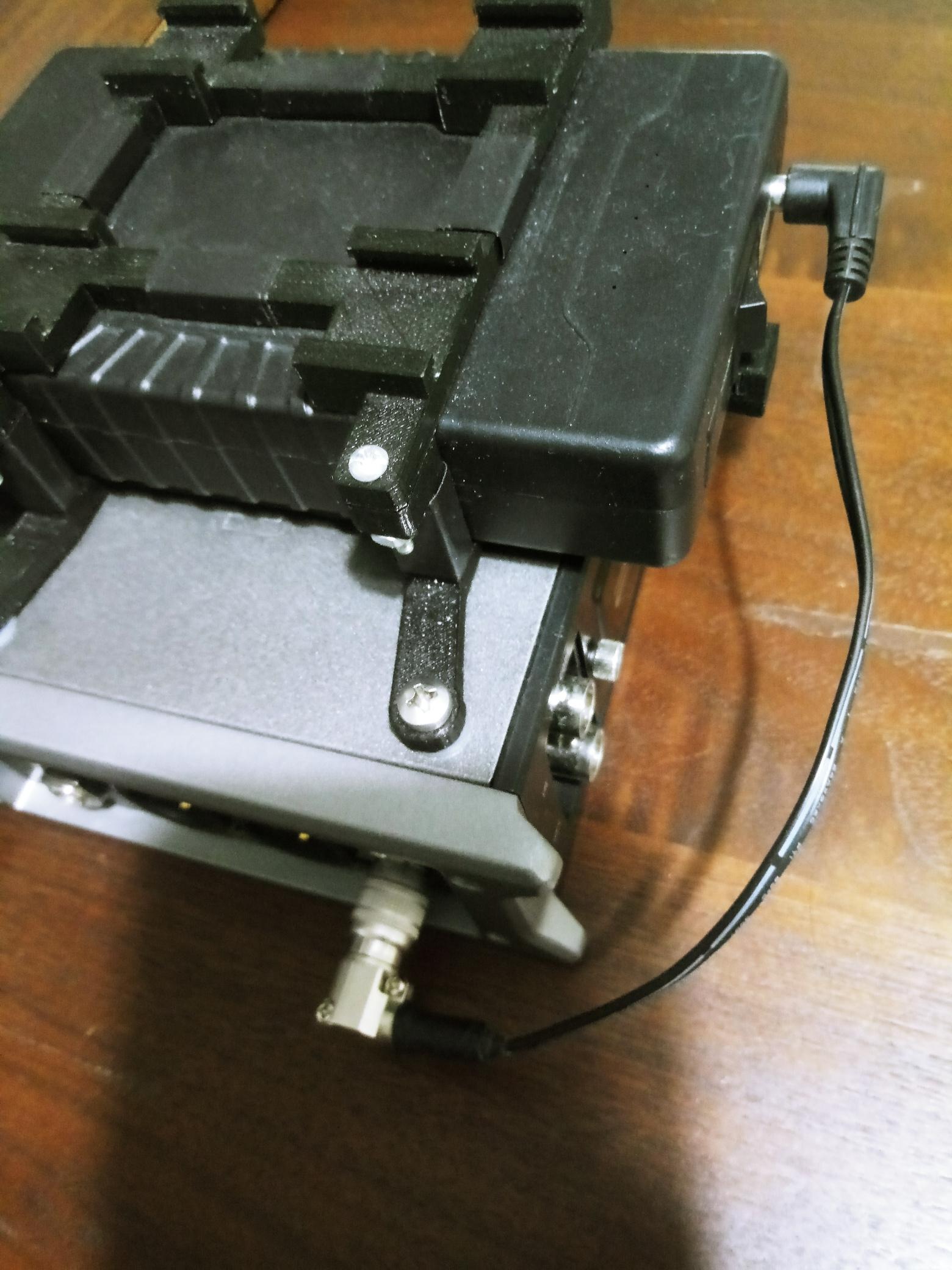
@Dave Tholen I was the original person to suggest Talentcell, and I use a couple for both audio and camera. Over the past year or so since I got them, I have found them to be very reliable and last for several days of shooting. The one I use on my F4 has a 2.1mm x 5.5mm plug, though there is also a larger battery that has a 2.5mm x 5.5mm plug on its 9v output. Talentcell batteries are 12.6 volts, not 12, though it drops over time since it's unregulated. For my F4, I got a right angle 4-pin hirose connector (https://www.bhphotovideo.com/c/product/1355760-REG/cable_techniques_ct_hrs4_r_4_pin_male_right_angle.html?ap=y&gclid=EAIaIQobChMI4s32tYOZ4wIVnIqzCh3pEgj7EAkYASABEgJuQfD_BwE&lsft=BI%3A514&smp=y) and made a short DC to hirose cable. The DHC-1 adapter was bulky, and the straight connector makes it hard to store in a bag, compared to the right angle connector. The battery itself is attached via a 3D printed bracket with some cold shoe mounts for lav receivers. HOWEVER... recently I have got strange electrical noises in some recordings. It's very rare. I use my F4 at least every other day on average, and the only times I have heard it were a couple days on a shoot last May. I can't reproduce it--yet. I suspect that it has something to do with the power supply. It could be that the battery isn't reliable. If so, that could be from someone dropping the battery on concrete a year ago. It could be a problem with my cable soldering. It could even be something wrong with the F4 itself. Despite that, I think the talentcell is a reliable battery. But now that I've written this I'll put some effort into actually figuring out what is making that noise, and report back if I find anything.

-
B and K for the dog. I think most looked good except J and L. E and F for the lake. I think most looked bad, with either way too much blue (eg K) or too little (eg L). I guess E would be my overall favorite, it looks pretty good on both the dog and shore. Thanks for the video!
-
Focusing breaks down into two parts. First, deciding what to focus on, and second, actually focusing on that object. The first task should be done by a person in most cases. There is no reason to do the second manually. The problem with the MF vs. AF decision is that we don't split those parts into distinct tools. Correct me if I'm wrong, but there is currently nothing out there that uses the camera's AF system, but allows for complete manual control of which part of the image the camera is using DPAF to focus on. You can use a touchscreen tap to focus in some cases, but that's unusable in most situations that you really need a focus puller for--for example steadicam shots. It's pretty easy to imagine a better system, where a focus puller makes all the artistic decisions, but the actual precision work of moving the lens elements is automatic.
-
Prores raw from the z6 is one of four options. 1. It is a 4k crop (likely). 2. It is 4k full frame using line skipping or binning, probably producing bad artifacts 3. It is 6k full frame. 4. It is oversampled and really should not be called raw.
-
I was talking about prores raw over hdmi. You can't oversample raw that way.
-
I meant making a LUT in DisplayCal so that the calibration is used in Resolve. AFAIK, the only system-wide calibration that software like displaycal can do is adjust the VCGT, which is gamma and doesn't effect color. So if you calibrate your monitor, you have to follow the steps in that wiki page I linked to earlier. However, it does seem that on Mac, Resolve uses the ICC profile and thus you don't have to go through those steps. I'm not completely sure, and probably a lot of my confusion is from reading contradictory information without realizing that the OS's behaved differently. Thanks, I have since learned that on Mac, Resolve actually uses the system's ICC profile, and thus you wouldn't have to go through those extra steps. It's quite a big difference with the LUT and without, very noticeable on my system. The "1D LUT" he mentions is just a gamma adjustment, while the 3D LUT provides the same color adjustments as the ICC profile does for programs that use system color management.
-
There are two sections in that wiki, one for using it with a Decklink monitor, and one for using it with a desktop monitor. Seems pretty clear in this conversation with DisplayCAL's creator that you need both the ICC profile and LUT (which I just found today, and seems to be a strong confirmation of what I was doing). https://hub.displaycal.net/forums/topic/resolve-lut-for-gui-viewer-profile-loader-both-needed/
-
@Geoff CB As far as I can tell, Resolve on Windows doesn't use the ICC profile that DisplayCAL (or other calibration software) generates, so you need to create a 3D LUT to have the calibration applied to Resolve's viewers. See: https://hub.displaycal.net/wiki/3d-lut-creation-workflow-for-resolve/ however, some of the information that I found about it is very confusing and contradictory.
-
@Volumetrik I use DisplayCal with a Spyder as well. Do you happen to use Resolve? Do you know the process to creating a color correction LUT from DisplayCal to use in Resolve? I am not particularly confident that I did it correctly.